Free AI Photo Editor Online: Edit, Enhance and Transform Your Photos with AI
Harry November 19, 2026 0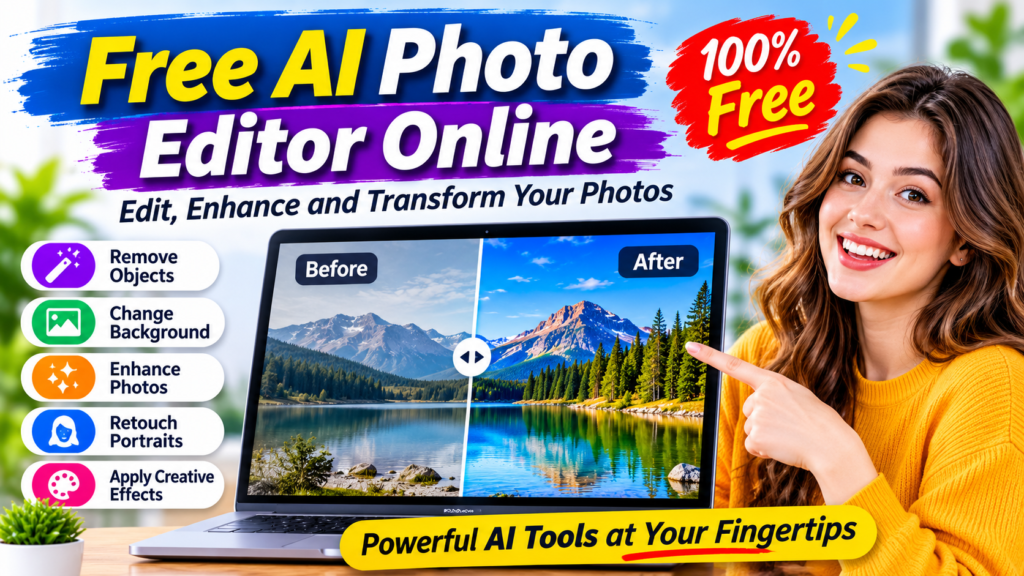
Free AI Photo Editor Online
Editing photographs no longer requires expensive software, professional design skills or hours of manual adjustments. Artificial intelligence has introduced a faster way to improve pictures, remove unwanted objects, replace backgrounds and create impressive visual effects.
A free AI photo editor online allows users to upload an image, describe the changes they want and let artificial intelligence handle much of the editing process. Instead of manually adjusting every detail, users can take advantage of automated tools that make everyday photo editing easier.
Whether you are a student, content creator, photographer, online seller or someone who enjoys taking pictures, AI-powered editing tools can help you improve your images directly from a web browser.
In this guide, we will explore how free AI photo editing works, which features matter most, how to edit pictures step by step, and how to get better results using simple AI prompts.
What Is a Free AI Photo Editor Online?
A free AI photo editor online is a browser-based application that uses artificial intelligence to modify, enhance or transform photographs.
Traditional photo editing often involves selecting individual areas, adjusting brightness, changing colors and working with different editing layers. AI-powered editors simplify many of these tasks by automatically identifying objects, backgrounds, faces and other image elements.
For example, you can upload a photograph and ask an AI editor to:
- Remove an unwanted person from the background.
- Replace a cloudy sky with a beautiful sunset.
- Improve image brightness and sharpness.
- Remove distracting objects.
- Change the background of a portrait.
- Restore an old photograph.
- Add creative elements to an existing picture.
- Transform an ordinary photograph into an artistic design.
Some editors provide free usage through daily limits or starter credits, while others offer basic features without payment. The exact restrictions depend on the service.
How Does AI Photo Editing Work?
AI photo editing uses machine learning models trained to recognize visual information and generate image modifications.
When you upload a photograph, the system analyzes its contents and determines which elements need to be changed.
For example, when you request background removal, the AI identifies the main subject and separates it from the surrounding environment.
When you ask it to remove an object, the system examines the surrounding pixels and generates replacement details that fit the image.
Most prompt-based AI photo editors follow three basic stages:
1. Image analysis
The AI examines the uploaded picture to identify important objects, people, colors, backgrounds and visual details.
2. Processing your instructions
The system interprets your written prompt and determines the changes required.
3. Generating the edited image
The AI produces a modified version of the photograph based on your instructions.
Some tools also provide manual controls, allowing users to refine the results after automatic editing.
Best Features to Look for in a Free AI Photo Editor Online
Not every photo editor provides the same capabilities. Before choosing a platform, consider which features are important for your editing requirements.
1. AI Object Removal
Object removal is one of the most useful AI photo editing features.
Sometimes a photograph looks perfect except for an unwanted object in the background. It could be a person, rubbish bin, wire, signboard or another distracting element.
An AI object remover can identify the selected object and generate replacement background details.
Example prompt:
“Remove the person standing behind the main subject. Reconstruct the background naturally and keep everything else unchanged.”
This feature is useful for travel photography, social media pictures and professional product images.
2. AI Background Replacement
Changing an image background can completely transform its appearance.
For example, you can replace a messy room with a clean studio background or change an ordinary product photograph into a professional-looking promotional image.
Background replacement is particularly useful for:
- Online shopping product photography.
- Professional profile pictures.
- Social media content.
- Marketing advertisements.
- Portfolio images.
- Creative photography projects.
Example prompt:
“Replace the existing background with a modern white photography studio. Maintain the original subject, natural shadows and realistic lighting.”
3. AI Photo Enhancement
Low-quality photographs can sometimes appear dark, blurry or lacking in detail.
AI enhancement tools attempt to improve visual quality through automatic adjustments.
Common enhancement options include:
- Brightness correction.
- Contrast improvement.
- Color balancing.
- Noise reduction.
- Image sharpening.
- Detail enhancement.
- Exposure correction.
These features can make photographs look clearer and more balanced, although they cannot always recover details that were never captured in the original image.
4. AI Portrait Retouching
Portrait retouching helps improve photographs of people.
Depending on the editor, users may be able to smooth skin, adjust lighting, reduce unwanted shadows and improve facial details.
For natural results, avoid excessive editing. Small adjustments usually produce more realistic photographs than dramatic changes.
Example prompt:
“Improve the lighting, reduce harsh shadows and make the portrait look professionally photographed. Preserve the person’s natural facial features and expression.”
5. Old Photo Restoration
Old family photographs often become faded, scratched or damaged over time.
AI restoration tools can attempt to repair these problems by improving contrast, reducing noise and reconstructing missing visual details.
Some tools also provide colorization features for black-and-white photographs.
Keep in mind that AI restoration may generate details that are not present in the original photograph. Always preserve an untouched copy of important family pictures.
6. AI Image Restyling
Want to transform an ordinary photograph into something creative?
AI image restyling allows users to experiment with different visual appearances.
Possible styles include:
- Cartoon illustrations.
- Anime-inspired artwork.
- Digital paintings.
- Cinematic photography.
- Vintage effects.
- Artistic portraits.
- Three-dimensional visual styles.
These options can be useful for profile pictures, creative projects and social media content.
How to Edit Photos Using a Free AI Photo Editor Online
Most modern AI editing tools are designed for beginners. You do not need advanced photography or graphic design knowledge to get started.
Follow these steps to edit your first photograph.
Step 1: Choose an Online AI Photo Editor
Start by selecting a browser-based photo editing service.
Consider its available features, free usage allowance, supported image formats and download restrictions.
Some examples include:
- ImagineArt AI Image Editor: Offers prompt-based editing, object removal, background changes, portrait retouching and image restyling.
- PDFSimpli AI Photo Editor: Promotes automated enhancements, image restoration, sharpening and color adjustments.
You can explore these tools through their respective websites.
Step 2: Upload Your Photograph
Choose a clear photograph from your computer or mobile device.
For better results, use an image with sufficient resolution, good lighting and a clearly visible subject.
Avoid heavily compressed images whenever possible.
Step 3: Describe What You Want to Change
This is where AI editing becomes particularly convenient.
Instead of manually selecting editing tools, write a simple instruction explaining the desired result.
For example:
“Change the background to a beautiful beach during sunset. Keep the person in the original position and maintain realistic lighting.”
Be specific about what should change and what should remain untouched.
Step 4: Generate the Edited Image
Submit your prompt and allow the AI system to process the photograph.
Depending on the platform, image size, editing model and server workload, processing may take several seconds or longer.
Step 5: Review and Download
Examine the generated image carefully.
Check facial details, object edges, shadows, background consistency and overall image quality.
If something looks incorrect, refine your instructions and generate another version.
Once satisfied, download the finished photograph if your selected platform allows it.
10 Useful AI Photo Editing Prompts You Can Copy
Writing effective prompts is one of the easiest ways to improve AI editing results.
Here are ten practical examples for different photography requirements.
1. Professional portrait
“Transform this photograph into a professional studio portrait with soft lighting, a clean background and natural skin tones. Preserve the person’s identity and facial features.”
2. Background replacement
“Replace the existing background with a modern luxury office interior. Maintain realistic shadows and keep the original subject unchanged.”
3. Remove unwanted objects
“Remove all distracting objects from the background while preserving the main subject, original composition and natural surroundings.”
4. Improve image quality
“Enhance the sharpness, brightness and color balance of this photograph. Reduce visible noise while preserving natural textures.”
5. Product photography
“Place this product on a clean premium white surface with professional studio lighting, realistic shadows and a minimal commercial photography style.”
6. Sunset effect
“Transform the sky into a beautiful golden sunset with warm natural lighting. Preserve the original landscape and make the result photorealistic.”
7. Social media portrait
“Create a modern social media portrait with attractive lighting, balanced colors and a visually appealing background. Keep the person’s original appearance.”
8. Old photograph restoration
“Restore this old photograph by reducing scratches, improving contrast and repairing damaged areas. Preserve the original facial characteristics.”
9. Creative cartoon effect
“Transform this photograph into a colorful cartoon illustration with clean outlines, expressive details and vibrant colors.”
10. Professional photography effect
“Give this image a professional DSLR photography appearance with natural depth of field, balanced exposure and realistic colors.”
A useful technique is to make one major change at a time. If you request several unrelated modifications in one prompt, the AI may not handle every instruction correctly.
Free AI Photo Editor vs Traditional Photo Editing Software
AI-powered editing and traditional editing software serve different purposes.
| Feature | AI photo editor | Traditional editor |
|---|---|---|
| Object removal | Often automated | Usually manual or tool-assisted |
| Background replacement | Prompt-based or automatic | Selection-based |
| Image enhancement | AI-assisted | Manual adjustments |
| Portrait retouching | Automated options | Detailed manual control |
| Learning process | Generally easier | Can require practice |
| Editing precision | Depends on AI model | Often greater manual control |
| Browser access | Available with web-based tools | Depends on software |
For quick edits and creative transformations, AI tools can save considerable time.
For complex professional projects requiring pixel-level precision, detailed masking and advanced compositing, traditional editing software may still be preferable.
Many creators benefit from combining both approaches.
Who Can Benefit from Online AI Photo Editing?
AI photo editing is useful for different types of users.
Bloggers and Content Creators
Bloggers need attractive images for articles, social media posts and promotional materials.
AI editing can help improve photographs, create consistent backgrounds and prepare visual content more efficiently.
Online Store Owners
Product photographs influence how customers perceive online products.
An AI editor can help sellers create cleaner product backgrounds, improve lighting and prepare different promotional variations.
However, product images should accurately represent the actual item being sold.
Students and Teachers
Students may use image editing tools for presentations, assignments and creative educational projects.
Teachers can also use AI-assisted editing to prepare illustrations and visual learning materials.
Social Media Managers
Social media content often requires different image sizes, backgrounds and visual styles.
AI tools can help create multiple versions of an image for different platforms and campaigns.
Photography Enthusiasts
People who enjoy photography can experiment with creative editing without spending hours learning advanced software.
AI can provide a convenient starting point for improving personal photographs.
Is a Free AI Photo Editor Online Really Free?
This is an important question because the word “free” does not always mean unlimited access.
Different platforms use different pricing models.
Some offer free editing without requiring payment. Others provide limited daily usage, introductory credits or free accounts with restrictions.
Common limitations include:
- A limited number of AI editing credits.
- Restrictions on image resolution.
- Watermarks on exported images.
- Limited access to advanced editing models.
- Paid subscriptions for additional features.
- Commercial-use restrictions.
For example, ImagineArt states that free accounts receive monthly credits for a limited number of edits, while additional capabilities are available through paid plans.
PDFSimpli promotes its AI photo editing capabilities, but you should check its current pricing and terms before assuming that all editing and downloading features are free.
Always check the actual export conditions before uploading important images or starting a project.
Important Privacy Tips Before Uploading Photos
AI photo editors may process uploaded images through online servers. This makes privacy an important consideration.
Before using an online editing platform:
- Read its privacy policy.
- Check how uploaded photographs are stored and processed.
- Avoid uploading sensitive identity documents.
- Be careful when uploading private family photographs.
- Check whether images can be deleted after processing.
- Review commercial-use and licensing conditions.
- Avoid using AI editing to create misleading images of real people.
If privacy is a major concern, consider an editor that processes images locally on your device.
Common Problems With AI Photo Editing and How to Fix Them
Even advanced AI systems sometimes produce unexpected results.
Here are some common problems and possible solutions.
Unnatural faces: Ask the AI to preserve facial features and avoid excessive retouching.
Incorrect object removal: Use a more specific prompt describing the object and surrounding background.
Unrealistic shadows: Mention the original light direction and request consistent shadows.
Blurry results: Start with a higher-quality original image and check the export resolution.
Unwanted changes: Clearly explain which parts of the photograph must remain unchanged.
Incorrect background details: Describe the replacement environment with more detail and generate another version.
Remember that AI editing is not always perfect. Reviewing the final image is an important part of the process.
The Future of AI Photo Editing
AI photo editing technology is developing quickly.
Modern tools are moving beyond simple filters and automatic brightness adjustments toward more advanced image understanding and prompt-based editing.
Several developments are particularly interesting.
More accurate editing instructions: Newer models are becoming better at understanding natural language and following detailed image-editing requests.
Improved subject consistency: AI systems are increasingly focused on preserving important details, including faces, objects and visual composition.
Faster creative workflows: Automated editing can help creators produce multiple image variations without repeating every manual step.
Better product photography: Online businesses can use AI-assisted editing to prepare promotional visuals and product backgrounds more efficiently.
More accessible editing tools: Browser-based platforms are making advanced image editing available to people who do not have professional software or design experience.
These developments could make image editing more accessible to everyday internet users.
Frequently Asked Questions
1. What is the best free AI photo editor online?
The best option depends on your requirements. Compare available editing features, free credits, export quality, privacy policies and pricing before choosing a platform.
2. Can I edit photos online without installing software?
Yes. Many AI photo editors operate directly in web browsers. You can upload an image, apply edits and download the result without installing a desktop application.
3. Can AI remove unwanted objects from photos?
Yes. Many AI editors include object-removal features that identify unwanted elements and generate replacement background details.
4. Can I change a photo background using AI?
Yes. AI background replacement tools can replace existing environments with studios, outdoor scenes, landscapes and other settings.
5. Do free AI photo editors add watermarks?
It depends on the platform. Some provide watermark-free downloads, while others restrict exports or require a paid subscription for watermark removal.
6. Can AI improve blurry photographs?
AI enhancement tools can sometimes sharpen images, reduce noise and improve visible details. However, results depend on the original photograph and the capabilities of the editing model.
7. Is an online AI photo editor safe?
It can be safe when you choose a reputable service and understand its privacy practices. Review how images are processed and avoid uploading confidential photographs to unfamiliar websites.
8. Can beginners use AI photo editing tools?
Absolutely. Most prompt-based editors are designed to be beginner-friendly. You can describe the changes you want without learning complicated editing techniques.
9. Can I use AI-edited photographs for commercial purposes?
Some platforms allow commercial use, while others apply restrictions to free accounts or particular AI models. Always review the applicable licensing terms before using images in advertisements or business projects.
10. What image formats do AI photo editors support?
Many online editors support common formats such as JPG, JPEG, PNG and WEBP. Supported formats and file-size limits vary between platforms.
Final Thoughts
A free AI photo editor online can make image editing easier, faster and more accessible. From removing unwanted objects and replacing backgrounds to enhancing portraits and restoring old photographs, artificial intelligence offers many useful possibilities.
The best editing experience depends on choosing a platform that matches your needs, understanding its free usage restrictions and writing clear editing instructions.
Whether you are creating social media graphics, improving personal photographs or preparing product images for an online store, AI-powered photo editing can help simplify your creative workflow.
Start with a simple photograph, try a few editing prompts and compare the results. With the right approach, you can transform ordinary pictures into more polished and visually appealing images without needing advanced editing skills.